The guides collected here will help you with various software questions.

Additional fields in the list of email recipients may help you to personalize messages you send for each recipient. Look at this example.
Create a mailing list with the entries below:
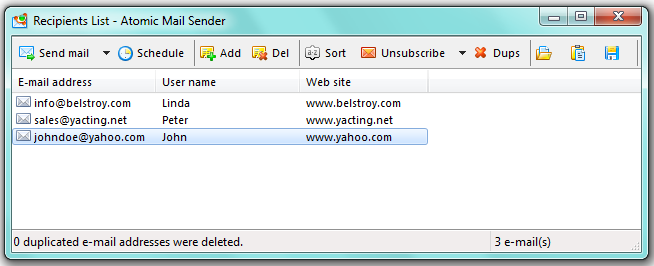
To add new data fields to the list, please right-click the column header. A context menu will appear. You can add new columns there. To add the recipient, click “Add” button.
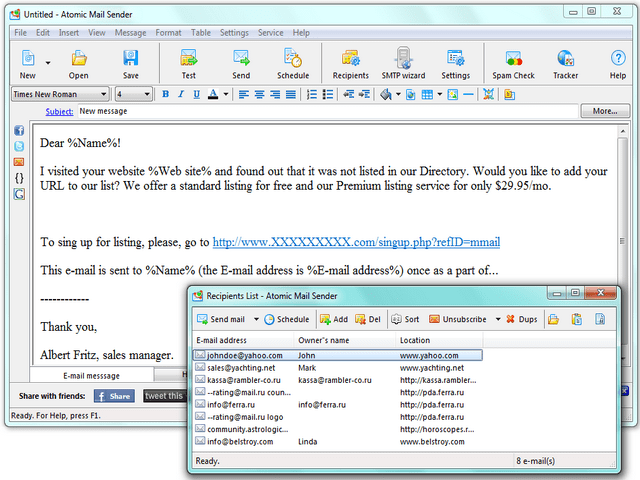
Enter the messages text in the “Message Edit window”. For your convenience, we have added the
- "Insert"
- "Email merge data"
menu where you can easily insert data fields.
See the sample text below:
Dear %Name%.
I visited your website %Web site% and found out that it was not listed in our Directory. Would you like to add your URL to our list? We offer a standard listing for free and our Premium listing service for only $29.95/mo.To sign up for the listing, please go to www.XXXXXX.com/signup.php?refID=mmail
This email is sent to %Name% (the email address is %E-mail address%) once as part of …
—
Thank you,
Albert Fritz, sales manager
When you send personalized mail, your recipients will receive messages with their real names and website URLs inside. This will improve response rates compared to non-personalized messages.
It’s important! Email personalization does not work when you send a test message.
Back














