The guides collected here will help you with various software questions.

First of all you have to select the list to be processed from the column on your left.
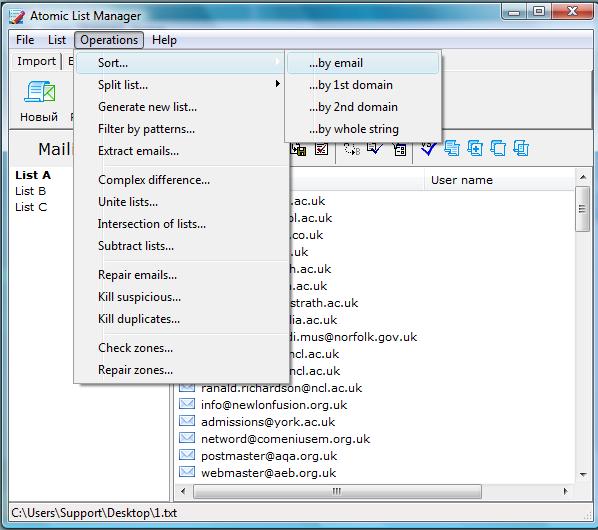
Now you can sort by:
Email ー sorting emails in alphabetical order;
| Original list | Sorted list |
| lori@creonline.com jeanne@creonline.com brandoncbsre@lycos.com mei122@aol.com rehab@bencarmona.com hamishjimmy@yahoo.com pzanders@comcast.net jon@morrow.net doug@ahaltd.com bizeemike@aol.com bucholtz@bellatlantic.net acuffee@cox.net |
acuffee@cox.net bizeemike@aol.com brandoncbsre@lycos.com bucholtz@bellatlantic.net doug@ahaltd.com hamishjimmy@yahoo.com jeanne@creonline.com jon@morrow.net lori@creonline.com mei122@aol.com pzanders@comcast.net rehab@bencarmona.com |
1-st domain – sorting by the 1st level domain name (email may have two domains);
| Original list | Sorted list |
| lori@creonline.com jeanne@creonline.com brandoncbsre@lycos.com mei122@aol.com rehab@bencarmona.com hamishjimmy@yahoo.com pzanders@comcast.net jon@morrow.net doug@ahaltd.com bizeemike@aol.com bucholtz@bellatlantic.net acuffee@cox.net |
doug@ahaltd.com bizeemike@aol.com mei122@aol.com bucholtz@bellatlantic.net rehab@bencarmona.com pzanders@comcast.net acuffee@cox.net jeanne@creonline.com lori@creonline.com brandoncbsre@lycos.com jon@morrow.net hamishjimmy@yahoo.com |
2-nd domain – sorting by the 2nd level domain name;
| Original list | Sorted list |
| lori@creonline.com jeanne@creonline.com brandoncbsre@lycos.com mei122@aol.com rehab@bencarmona.com hamishjimmy@yahoo.com pzanders@comcast.net jon@morrow.net doug@ahaltd.com bizeemike@aol.com bucholtz@bellatlantic.net acuffee@cox.net |
mei122@aol.com doug@ahaltd.co.jp acuffee@cox.net bucholtz@bellatlantic.net hamishjimmy@yahoo.mx.net jeanne@creonline.kiev.net jon@morrow.net pzanders@comcast.net brandoncbsre@lycos.com.ua bizeemike@aol.co.uk rehab@bencarmona.ac.uk lori@creonline.edu.us |
whole string – alphabetical sorting of the whole string;
| Original list | Sorted list |
| lori@creonline.com jeanne@creonline.com brandoncbsre@lycos.com mei122@aol.com rehab@bencarmona.com hamishjimmy@yahoo.com pzanders@comcast.net jon@morrow.net doug@ahaltd.com bizeemike@aol.com bucholtz@bellatlantic.net acuffee@cox.net |
acuffee@cox.net bizeemike@aol.com brandoncbsre@lycos.com bucholtz@bellatlantic.net doug@ahaltd.com hamishjimmy@yahoo.com jeanne@creonline.com jon@morrow.net lori@creonline.com mei122@aol.com pzanders@comcast.net rehab@bencarmona.com |














