Mobile Marketing:

Bulk SMS Sender New!
Bluetooth® Sender

E-marketing Software:

Email Studio
Bulk Emailer

Email Extractor
Email Harvester
Newsgroup Extractor
CD Email Extractor
Whois Extractor
Web Spider

Email Verifier
Mailing List Manager
Bulk Email List Manager
Maillist TLD Filter Free!

E-mail marketing services

Atomic Mail Tracker
Email Verifier Online
List Manager Online
Atomic Survey service

Databases:

Websites' Catalogue
Domain Catalogue
Whois Database

Miscellaneous:

Email Autoreply


Start your e-mail campaign

Download software
Purchase
Special offers
Order CD-ROM
Purchasing wizard

Customer support

Feedback form
Testimonials
FAQ
News and updates
Glossary of terms
Anti SPAM policy
Privacy policy
Email Marketing Ezine

Partnership

Partnership Opportunities


Member Area LOGIN


Atomic Mail Sender screenshots

Click to enlarge

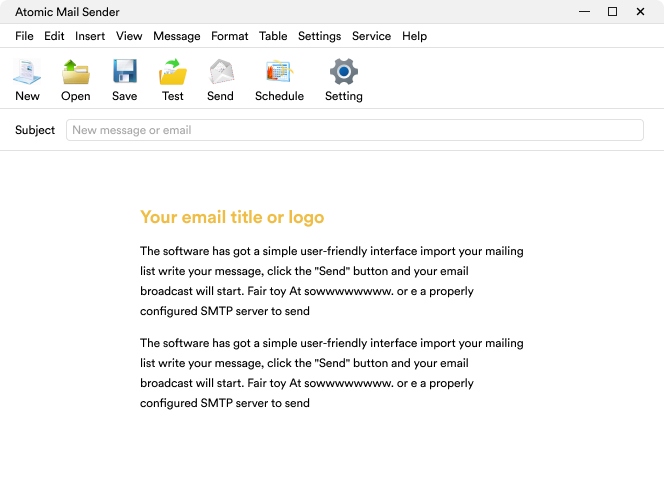
Main window of Atomic Mail Sender

You can create a message like you do in Outlook by using any font styles, inserting images and attaching files. All common text editing controls are available.


Click to enlarge

Email templates

Create your email newsletter by using built-in HTML templates. Actually, you can use your own templates or modify the suggested ones. Our collection contains email templates for certain situations.

Click to enlarge

Mail merge

Mail merge is the perfect way to create a single e-mail message that contains unique variables. The data variables will be used to specify the recipient's name, address, first name for the salutation etc. When the mail merge is run, each letter will be personalized to the recipient and will show the information that is applicable to them.

Click to enlarge

Click to enlarge

Email addresses window

1. Load a list of addresses here.

2. Create, edit and save your mailing list databases, add individual data for further substituting the data variables in the template while the procedure of mail merging is carried out.

Click to enlarge

Message details editing window

In the Message properties window you can define the return address, the name of the sender of the message and other return information in order to provide the recipient with means to determine how to respond to the sender if needed. Any files can be attached to the message here.

Click to enlarge

Common Settings of Atomic Mail Sender

This is the Control Panel of the mailer, here you can change the connection settings, message layout specification, etc.

Click to enlarge

Task settings window

Schedule delayed delivery of your email messages by specifying particular rules for your projects (email campaigns).

To see the list of currently scheduled projects, add new tasks, edit or delete existing tasks, use the Service -> Scheduled projects command in AMS.

Click to enlarge

Send test message to verify the settings

Before sending out bulk email it is recommended to send a test message to evaluate the programs' functionality and to verify if the settings are correct.

You can view the sent message log in 'SMPT connection report' describing the message-sending process to know at what stage the error, if any, has occurred. If test messaging is ok, you can use the program for bulk emailing.

Click to enlarge

Set the program to track your email campaign

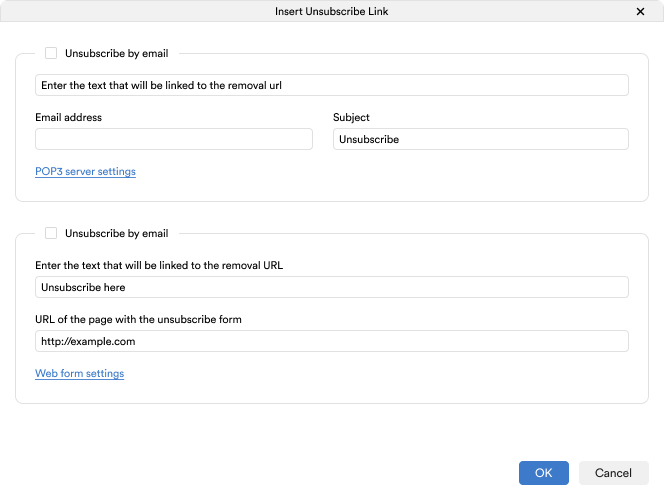
Register with the Atomic Email Tracker service beforehand! Then insert the special tracking code by clicking the Insert -> Tracking code on the upper menu and entering your personal Tracker Account Login data and the Message ID (any identifier for your campaign) where required.

Click to enlarge

Send Mail Monitor

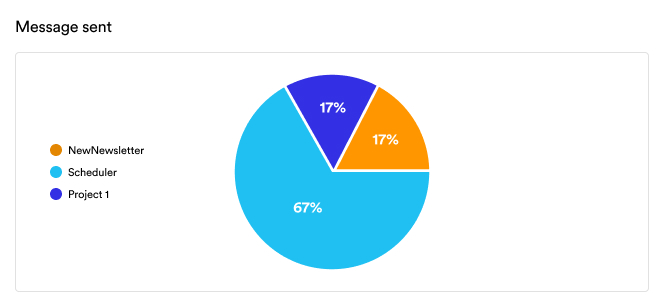
Here you can stop, pause and resume the sending process or just view the detailed reports at any time you like.

Try & buy

Click the following link to order the fully licensed version without trial limitations right now (any major credit cards are accepted):

 Order Atomic Mail Sender for $79.85

Note! Atomic Mail Sender is licensed on a per computer basis including lifetime technical support and one-year free upgrades!

Atomic programs are distributed in the shareware way. Download Atomic Mail Sender (a trial version) and try it before purchasing (in trials some features are locked, e.g. you can only send bulk email to at most 50 recipients).

Discounts & special offers

Find out more about package offers and other discounts in the Discounts & Packages section.

Hotline

2010-01-25:
Atomic Mail Sender 5.15 release

2010-01-13:
Atomic Web Spider 2.41 release

2009-12-28:
Atomic Subscription Manager 7.02 release

To all news

Mail Sender info

AMS Description

AMS Screenshots

AMS Upgrade history

AMS Testimonials

Download AMSDownload Atomic Mail Sender
Atomic Mail Sender 5.15 (updated January 25, 2010)

Purchase AMSBuy Atomic Mail Sender
Order a fully licensed version of Atomic Mail Sender for $79.85 with email delivery right now!

Emailer resourcesBulk emailer resources
Atomic Mail Sender's knowledge base

Awards

Awards for
       our Bulk Mailer

Articles

How to compose a great email message

Get rid of problems sending mail

What do the error codes for non-sent email mean?

Get rid of AOL.COM mail delivering error

Using e-mail acronyms

Do you usually send long or short bulk email messages?

New articles

What do you know about email marketing?

E-mail list segmentation

Dissecting a successful direct marketing e-mail

What are keywords good for?

Words you should and should not use in e-mail advertising campaigns


Home / Purchasing / Download / Free services / No group mail / About us / Partner with us / Our partners / Forum / Blog new/ Contact us